Construction Operations Features for Field-to-Office Workflows

Coordinate scheduling, field documentation, extra work, daily inputs, and office review workflows from one contractor-focused operating system.
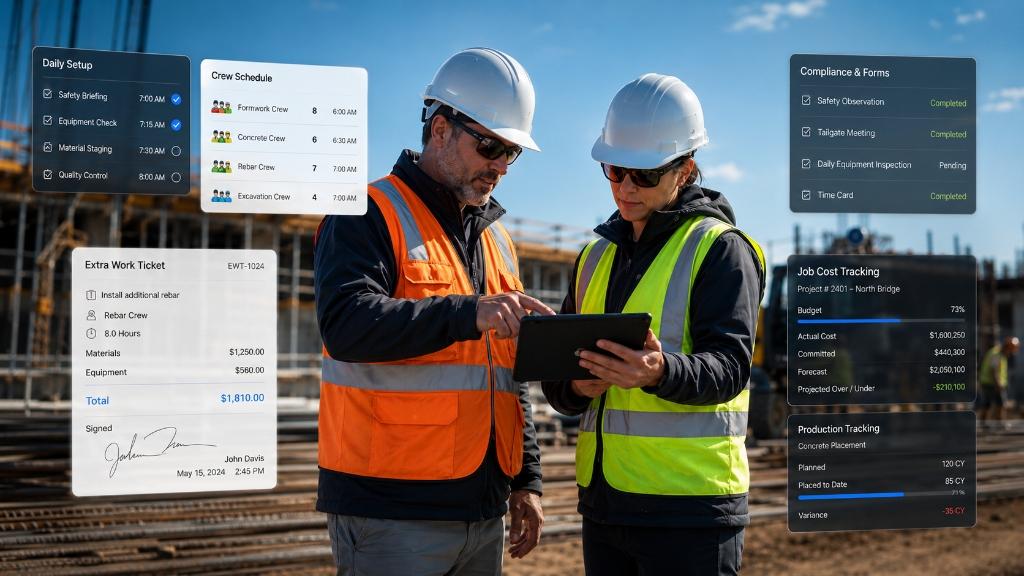
Construction management dashboard overview

Built for Established Contractors

Outgrown folders, whiteboards, and disconnected tools? See how ForContractors helps established contractors coordinate crews, documentation, job-cost review inputs, extra work, and field-to-office workflows without taking on unnecessary enterprise complexity.

Project Records: Keep Job Information Organized

Core Workflow

Put active and historical job information somewhere the office can actually find it.

Helps contractors organize job documents, daily records, photos where supported, signatures, and field notes so teams are not relying on folders, scattered texts, or one person’s memory.

Centralized Job Files: Keep project records and field documentation connected to the right job.
Field-to-Office Context: Give office teams cleaner information to review before decisions, billing, or follow-up.
Searchable Records: Make it easier to look back at job activity, notes, forms, and documentation.
Better Handoff: Reduce the amount of information trapped in notebooks, text threads, and inboxes.

Daily Field Inputs: Cleaner Job-Cost Review

Operational Workflow

Capture daily activity closer to the field so the office has better information to review.

Helps supervisors record labor notes, material notes, extra work, and job updates so project managers and office teams can review field activity with more context.

Daily Activity Logs: Record job updates while the work is still fresh.
Labor and Material Notes: Capture field inputs for office review without turning the page into a financial guarantee.
Extra Work Context: Keep out-of-scope work connected to the job record when documentation is needed.
Review-Friendly Data: Organize information so managers are not chasing paper at the end of the week.

Extra Work Tickets: Document Work Before It Gets Lost

Core Workflow

Give field teams a clearer way to capture out-of-scope work for review.

Supports extra work documentation with clearer notes, job context, photos where supported, and customer sign-offs where appropriate, so office teams have a cleaner record to review.

Field Documentation: Capture what happened, where it happened, and why it matters.
Signature Support: Use customer sign-offs as part of the field documentation workflow where appropriate.
Office Review: Help the office review extra work with better context before deciding next steps.
Organized Follow-Up: Keep extra work tied to the job instead of scattered across calls, texts, and paper.

Crew Scheduling: Coordinate the Workday

Operational Workflow

Help office and field teams stay aligned as crews, jobs, and priorities change.

Gives operations teams a shared scheduling workflow for planning crew assignments, reviewing daily needs, and communicating job information through production-ready web-based workflows.

Crew Assignments: Plan which crews are connected to which jobs and daily priorities.
Shared Schedule View: Reduce reliance on whiteboards and one-off text threads.
Change Coordination: Help the office communicate schedule updates with less confusion.
Notification Review: Notification options can be reviewed during demo intake based on your setup.

Dispatch Log & Calendar: Daily Coordination

Operational Workflow

Create a clearer operating rhythm for jobs, crews, and daily field activity.

Helps teams coordinate job readiness, crew movement, material notes, field updates, and daily work planning without forcing everything through whiteboards or disconnected spreadsheets.

Daily Planning: Keep job activity and crew coordination visible to the office.
Material Notes: Track field-relevant material notes for office review.
Job Readiness: Help teams see what needs attention before the day starts.
Workflow Fit Review: Specialized workflows can be reviewed during demo intake if needed.

Notifications: Keep Follow-Up Moving

Demo Review

Use communication workflows to reduce the amount of chasing between field and office.

Supports field-to-office coordination by helping teams review notification and follow-up workflows during demo intake instead of assuming every alert behavior is available out of the box.

Follow-Up Support: Help teams keep track of work that needs review or attention.
Field-to-Office Coordination: Support cleaner communication around daily updates and missing information.
Workflow Review: Confirm notification behavior during the demo based on your team’s current process.
Expectation Setting: Review alert and follow-up behavior before assuming a specific notification workflow.

Online Forms: Safety Documentation Support

Core Workflow

Move field forms and safety documentation out of binders and into a more organized workflow.

Helps contractors organize field forms, safety documentation, daily checklists, sign-offs, and project records to support internal compliance workflows without guaranteeing regulatory compliance.

Digital Field Forms: Replace paper forms with a more organized field documentation process.
Safety Documentation: Keep safety-related records connected to the right project.
Approval Records: Capture field sign-offs and review records where appropriate.
Compliance Support: Support documentation workflows without claiming legal or regulatory guarantees.

Estimator: Beta Workflow

Beta

Estimating is being tested carefully and should be reviewed during demo intake.

Estimator is currently in beta with select users. For new customers, the core focus remains operational execution: scheduling, field forms, extra work, documentation, and job-cost review inputs.

Beta Positioning: Keep estimating framed as a maturing workflow, not a fully released public promise.
Demo Intake: Review estimating needs during the demo to determine fit and timing.
Operational First: Start with the workflows that help crews and office teams coordinate active work.
Scope Review: Confirm which estimating workflows are available during demo intake.

Accounting Handoff: Cleaner Office Review

Demo Review

Help accounting and admin teams work from cleaner field and job information.

Helps organize job, field, and cost-related information for office review. Sage, QuickBooks, exports, and accounting handoff workflows should be reviewed during demo intake based on your current setup.

Cleaner Source Information: Give office teams better field records to review before accounting work begins.
Demo-Reviewed Workflows: Review Sage, QuickBooks, exports, and accounting handoff needs during intake.
Administrative Handoff: Organize daily logs, field notes, and supporting records for office administration.
Workflow Confirmation: Confirm accounting handoff details before assuming specific export or sync behavior.

See ForContractors in Action

Book a walkthrough to see how ForContractors can support your scheduling, documentation, extra work, and field-to-office workflows.

Book a Demo